Monday, August 6, 2012

google doodle olimpiade

udah ada yang liat belom gan,
kalo belom ke http://www.google.co.id/ dulu

google doodle lari2
atau kalo udah ganti kesini aja http://www.google.com/doodles/hurdles-2012

Friday, April 27, 2012

Edit Header Navigasi

hapus aja bagian $body = theme('menu_top'); di file common/theme.php
Code:
.....
function theme_page($title, $content) {
        $body = theme('menu_top');
.....
Trus bikin function baru lagi di common/theme.php. Misal
Code:
.....
function theme_google_analytics() {
        global $GA_ACCOUNT;
        if (!$GA_ACCOUNT) return '';
        $googleAnalyticsImageUrl = googleAnalyticsGetImageUrl();
        return "<img src='{$googleAnalyticsImageUrl}' />";
} 

function theme_mikarai() {
        $out = '<div class="menu"><center><a href="">Home</a> | <a href="/replies">Replies</a> | <a href="/search">Search</a> | <a href="/directs">Directs</a></div>';
    return $out;
} 
Jadi function theme_page seperti ini
Code:
.....
function theme_page($title, $content) {
         if (user_is_authenticated()) {
               $body = theme('mikarai');
        }
        $body .= $content;
.....
.....
Gunanya if (user_is_authenticated()) supaya menu itu gak muncul sebelum agan login.

Fitur Edit Profil

Edit file common/twitter.php nya gan..
PHP Code:
..........
.......... 
'trends' => array(
                
'hidden' => true,
                
'security' => true,
                
'callback' => 'twitter_trends_page',
        ), 
'profile' => array(
               
'security' => true,
               
'callback' => 'twitter_profile_page',
  ),
));

function 
twitter_profile_page() {

    
// process form data
    
if ($_POST['name']){
        
// post profile update
        
$post_data = array("name" => $_POST['name'],
            
"url" => $_POST['url'],
            
"location" => $_POST['location'],
            
"description" => $_POST['description'],
        );
        
$url "http://twitter.com/account/update_profile.json";
        
$user twitter_process($url$post_data);
    } else {
        
// retrieve profile information
        
$user twitter_user_info(user_current_username());
    }
    
    
$content theme('user_header'$user);
    
$content .= theme('profile_form'$user);
    
    
theme('page'"Profile Edit"$content);
}

function 
theme_profile_form($user){
    
// Profile form
    
$out .= "<form name='profile' action='profile' method='post'>
<hr />Name: <input name='name' maxlength='20' value='{$user->name}' />
<br />Bio: <input name='description' size=40 maxlength='160' value='{$user->description}' />
<br />Link: <input name='url' maxlength='100' size=40 value='{$user->url}' />
<br />Location: <input name='location' maxlength='30' value='{$user->location}' />"
;

    
// Javascript link to use Geo Coordinates
    
if(!empty($_COOKIE['lat']) && !empty($_COOKIE['long'])){
        
$out .= " <a href='javascript:document.forms[\"profile\"].location.value=\"dabr: {$_COOKIE['lat']},{$_COOKIE['long']}\";void(0);'>Use Geo</a>";
    }    

    
$out .= "<br /><input type='submit' value='Update' /></form>";

    return 
$out;
}

function 
long_url($shortURL)
{
        if (!
defined('LONGURL_KEY'))
..........
..........
..........  

Cara Buat Fitur Mute

Setelah saya menggunakan fitur mute yang sudah saya share sebelumnya, banyak sekali terjadi perubahan di twitter client saya, yang paling utama adalah url shorted berubah menjadi http://t.co semua, ini hal yang sederhana tapi saya pribadi tidak menginginkan fitur yang saya beri menjadi tidak berfungsi semestinya, nah dari situ saya menemukan triknya, agak pusing tapi menyenangkan...

Pertama, kamu buat file mute.php dan taruh di dalam folder common, isi file mute.php dengan code di bwah ini

code:

<?php

function muted_page($query) {
/*
mute landing page to show the mutedlist account
thanks for your respect to not change any information here :)
*/

$content = "<p>Muted Feature is help you to mute an annoying tweets from your timeline <img src='/smile/mv/sip.gif'><br/>";
$content .= "<br/>Just go to user profile page and click <b>`mute`</b> button to mute him/her tweet <img src='/smile/mv/ketawa.gif'>";
$content .= "</p>";

$act = $_REQUEST['act'];
$screen_name = $_REQUEST['user'];

if ($act != "" && $act != NULL) {
mute_save($screen_name,$act);
header('Location: '. BASE_URL . "mute");exit();

} else {
$muted_list = mute_read();
$content .= "<ul>";
foreach ($muted_list as $item) {
$content .= "<li>@$item&nbsp;";
$content .= "<a href='mute/?act=unmute&user={$item}'>Unmute</a></li>";
}
$content .= "</ul>";
theme('page', 'Muted List', $content);
}
}

function sensor($tl) {
/*
lembaga sensor tweets
here we censored any tweeps from mutedlist account
*/

$muted_list = mute_read();
$new_tl = array();

foreach ($tl as $item) {
$user = strtolower($item->from->screen_name);
if (!in_array($user,$muted_list)) $new_tl[strval($item->id)] = $item;
}
$hsl = json_decode(json_encode($new_tl));
return $hsl;
}

function mute_read() {
/* mutelist reader */

$muted_list = unserialize(base64_decode($_COOKIE['muted']));
if (!$muted_list) { return array();}
else { return json_decode($muted_list); }
}

function mute_save($new,$act) {
/* mutelist writer */

$new = strtolower($new);
$muted_list = mute_read();
if ($act == "mute") {
if (!in_array($new,$muted_list)) array_push($muted_list,$new);
} elseif ($act == "unmute") {
$tmp = array();
foreach ($muted_list as $item) {
if ($item != $new) array_push($tmp,$item);
}
$muted_list = $tmp;
}
$muted_list = json_encode($muted_list);
$duration = time() + (3600 * 24 * 365);
setcookie('muted', base64_encode(serialize($muted_list)), $duration, '/');
}

/* Remove mutedlist cookies when user logout */

if (!isset($GLOBALS['user'])) {
if(!array_key_exists('USER_AUTH', $_COOKIE)) {
$duration = time() - 3600;
setcookie("muted", NULL, $duration, '/');
setcookie("muted", NULL, $duration);
}
}

?>


Langkah selanjutnya, masuk ke file /common/twitter.php, tambahkan :

code pemanggilan file mute.php dengan cara menambahkan require 'mute.php'; di bagian awal file setelah code php

tambahkan code di dalam menu_register(array(

code:

'mute' => array(
'callback' => 'muted_page',
'security' => true,
), 


masih di dalam file yang sama, cari function twitter_home_page() dan pada code 

code:

$tl = twitter_standard_timeline($tl, 'friends');


danti dengan

code:

$tl = sensor(twitter_standard_timeline($tl, 'friends')); 


masih di dalam file yang sama, cari function theme_user_header($user) , tambahkan kode di bawah ini :

code:

if ($user->following !== false) {
$muted_list = mute_read();
if (in_array(strtolower($user->screen_name),$muted_list)) {
$out .= " | <a href='/mute/?act=unmute&user={$user->screen_name}'>Unmute</a>";
} else {
$out .= " | <a href='/mute/?act=mute&user={$user->screen_name}'>Mute</a>";
}
}


sebelum kode

code:

$out .= " | <a href='confirm/spam/{$user->screen_name}/{$user->id}'>Report Spam</a>";
$out .= " | <a href='search?query=%40{$user->screen_name}'>Search @{$user->screen_name}</a>";
$out .= "</div></div>";
return $out;
}


dan kalau bisa, jika agan menggunakan Embedly. tolong di cabut ya api keynya.
soalnya bentrok sama fitur ini....

Who's Online Dabr

[buat twitter who is online]

buat file count.php di root

Code:
<?php
error_reporting(E_ERROR | E_PARSE);
$dataFile = "onlineusers.txt";
if (user_is_authenticated()) {
    $user = user_current_username();
}
// this is the time in **minutes** to consider someone online before removing them from our file
// berapa menit tenggang waktu yg dibutuhkan untuk tahu user masih online atau tidak.
$sessionTime = 5;
if(!file_exists($dataFile)) {
    $fp = fopen($dataFile, "w+");
    fclose($fp);
}
$users = array();
$onusers = array();
// check up
$fp = fopen($dataFile, "r");
flock($fp, LOCK_SH);
while(!feof($fp)) {
    $users[] = rtrim(fgets($fp, 32));
}
flock($fp, LOCK_UN);
fclose($fp);
// clean up
$x = 0;
$alreadyIn = FALSE;
foreach($users as $key => $data) {
    list(,$lastvisit) = explode("|", $data);
    if(time() - $lastvisit >= $sessionTime * 60) {
        $users[$x] = "";
    } else {
        if(strpos($data, $user) !== FALSE) {
            $alreadyIn = TRUE;
            $users[$x] = "$user|" . time(); //updating
        }
    }
    $x++;
}
if($alreadyIn == FALSE) {
    $users[] = "$user|" . time();
}
// write up
$fp = fopen($dataFile, "w+");
flock($fp, LOCK_EX);
$i = 0;
foreach($users as $single) {
    if($single != "") {
        fwrite($fp, $single . "\r\n");
        $i++;
    }
}
flock($fp, LOCK_UN);
fclose($fp);
?>
edit file common/theme.php, tambahkan code :

Code:
if (user_is_authenticated()) {
        require_once("count.php");
    }
echo    '</body>
        </html>';
    exit();

sesudah
       
         </head>
         <body>';

      echo $body;
buat file online.php di root

Code:
<?php
$myFile = "onlineusers.txt";
$fsc = file($myFile);
$lines = count(file($myFile));
$content = "<div>".$lines." Online Users:<br />";
foreach($fsc as $line) {
    $array = explode("|", $line);
    $content .= $array[0] ."</a><br />";
}
$content .= "</div>";

?>
edit index.php

tmbahkan code 

Code:
'online' => array (
        'security' => true,
        'callback' => 'online_page',
    ),

di menu_register(


tambahkan juga function online page.
Code :

function online_page() {
    require_once("online.php");
    theme('page', 'Online Users', $content);
}
file onlineusers.txt akan otomatis terbuat. Chmod ke 777

kalo g otomatis tinggal buat file onlineusers.txt di root dan chmod ke 777

Mengatasi 404 Not Found dengan .htaccess d

Coba buat file .htaccess di folder root (/public_html/folder_tempat_script_dabr_yg_agan_simpan)

File .htaccess saya seperti ini
PHP Code:
# URL rewriting RewriteEngine on
RewriteCond 
%{REQUEST_FILENAME} !-f
RewriteCond 
%{REQUEST_FILENAME} !-d
RewriteRule 
^(.*)$ index.php?q=$[L,QSA]

<
IfModule header_module>
    
# 1 week cache
    
<FilesMatch "\.(png|ico)$">
    
Header set Cache-Control "max-age=604800, public"
    
</FilesMatch>
</
IfModule>  
Mudah2an bisa jalan, gan. Cmiwww...

Mengedit Footer

edit file common/theme.php
Jadi seperti ini
PHP Code:
....
....
function 
theme_page($title$content) {
        
$body theme('logo');
        
$body .= theme('menu_top');
        
$body .= $content;
        
$body .= theme('footer');
        if (
DEBUG_MODE == 'ON') {
                global 
$dabr_start$api_time;
                
$time microtime(1) - $dabr_start;
                
$body .= '<p>Processed in '.round($time4).' seconds ('.round($api_time $time 100).'% waiting for Twitter\'s API)</p>';
        }
        if (
$title == 'Login') {
                
$title 'mobile Twitter client';
                
$meta '<meta name="description" content="another mobile Twitter client" />';
        }
        
ob_start('ob_gzhandler');
        
header('Content-Type: text/html; charset=utf-8');
        echo    
'<!DOCTYPE html PUBLIC "-//WAPFORUM//DTD XHTML Mobile 1.0//EN" "http://www.wapforum.org/DTD/xhtml-mobile10.dtd">
                <html xmlns="http://www.w3.org/1999/xhtml">
                        <head>
                                <title>'
,Mikarai,' / ',$title,'</title>
                                <base href="'
,BASE_URL,'" />
                                '
.$meta.theme('css').'
                                <meta name="viewport" content="width=device-width; initial-scale=1.0;" />
                                <script type="text/javascript">'
.file_get_contents('js/ga.js').'</script>
                        </head>
                        <body>'
,  $body'</body>
                </html>'
;
        exit();
}
......
......
......
......

function 
theme_google_analytics() {
        global 
$GA_ACCOUNT;
        if (!
$GA_ACCOUNT) return '';
        
$googleAnalyticsImageUrl googleAnalyticsGetImageUrl();
        return 
"<img src='{$googleAnalyticsImageUrl}' />";
}

function 
theme_footer() {
        
$out '<div class="menu"><center><a href="followers">Followers</a> | <a href="/friends">Friends</a> | <a href="/lists">Lists</a> | <a href="/trends">Trends</a> | <a href="/search">Search</a> | <a href="/profile">Profile</a> | <a href="/about">About</a> | <a href="/settings">Settings</a><center><center><p><p><b>© Mikarai</b>.</center><b></p></p></div>';
    return 
$out;
}
?>  
Edit sesuka hati agan saja.. 

Menghilangkan About atau mengedit Menu di HomePage

Buka file common/user.php
Cari code ini
PHP Code:
function user_ensure_authenticated() {
    if (!
user_is_authenticated()) {
        
$content theme('login');
        
$content .= file_get_contents('about.html');
        
theme('page''Login'$content);
    }
}  
Cukup hilangkan aja kode
PHP Code:
$content .= file_get_contents('about.html');  

Mengatasi masalah Twitter Time Out

coba ganti: define('API_URL','http://api.twitter.com');
dengan yang ini: define('API_URL','http://api.twitter.com/1/');

ganti di config.php

Membuat Tweet otomatis terpotong jika lebih dari 140 karakter

Pertama agan buka /common/twitter.php --> buka pake notepad aja
trus cari sepenggal kode berikut :
Quote:
function twitter_update() {
twitter_ensure_post_action();
$status = twitter_url_shorten(stripslashes(trim($_POST['status'])));
nah dibawah kode itu , tambahin kode ini gan ..
Quote:
if (mb_strlen($status) > 140)
$status = mb_substr($status, 0, 140, 'utf-8');
kalo udah --> save --> upload lagi ke hostingan ..

Membatasi Jumlah Tweet yang Muncul di Home atau Timeline

edit file twitter.php di folder common.
cari kode dibawah ini
PHP Code:
function twitter_home_page() {
        
user_ensure_authenticated();
        
//$request = API_URL.'statuses/home_timeline.json?count=20&include_rts=true&page='.intval($_GET['page']);
        
$request API_URL.'statuses/home_timeline.json?count=20&include_rts=true';  
Ganti angka 20 itu sama 5 atau 6 (sesuai tweet yang mau ditampilin di home).

How to Create Twitter Bot using OAuth (like twitterfeed)

Twitter has announced to shut down the Basic Authentication API on August 31st and recommend Twitter application developers to migrate their apps to OAuth Authentication. What about bots? That’s the same. If you have bot created using Basic Authentication, then you should migrate your bot to OAuth. Here’s how, but first..

What is OAuth?

OAuth is a new authentication method that doesn’t use plain username & password to authenticate. OAuth uses a pair of tokens to check your credentials, therefore you don’t need to worry about leaking your password. These tokens are unique per user and per application. For further info about OAuth, check http://oauth.net/

So how?

First thing you need to do after creating bot account is creating an application. Go to http://dev.twitter.com/apps/new with your bot account and fill the form.

- Name: the application name will be shown after “via” in your tweets
- Application Type: You must choose ‘Browser’
- Default Access Type: Choose ‘Read and Write’
- Everything else you can fill any value

After created, go to you application detail. There you can see ‘Consumer Key’ and ‘Consumer Secret’ value. Save these keys.

Then click ‘My Access Token’ button in the right. You will see your ‘Access Token’ and ‘Access Token Secret’. You should save these keys too.

And now let’s go to the code!

You’ll need some libraries to utilize OAuth functions, so download Abraham’s TwitterOAuth library first. Copy the OAuth.php & twitteroauth.php files from downloaded library to your server, and create a new PHP file in the same directory.

And here’s the code:
this is the code I use for my bot @juru_doa
PHP Code:
require_once('twitteroauth.php');
define('CONSUMER_KEY''insert_your_consumer_key_here'); define('CONSUMER_SECRET''insert_your_consumer_secret_here'); define('ACCESS_TOKEN''insert_your_access_token_here'); define('ACCESS_TOKEN_SECRET''insert_your_access_token_secret_here');
$twitter = new TwitterOAuth(CONSUMER_KEYCONSUMER_SECRETACCESS_TOKENACCESS_TOKEN_SECRET); $twitter->host "http://search.twitter.com/"$search $twitter->get('search', array('q' => 'semoga''rpp' => 20));
$twitter->host "https://api.twitter.com/1/";
foreach(
$search->results as $tweet) {
    
$status 'Amiiiin RT @'.$tweet->from_user.' '.$tweet->text;
    if(
strlen($status) > 140$status substr($status0139);
    
$twitter->post('statuses/update', array('status' => $status));
}  
Quote:
What above code does?
After authenticating the OAuth tokens, it will do a search for ‘semoga’ keyword and grab the 20 most recent tweets. You can set another keyword for your bot. Then it will ReTweet each tweets and and ‘Amiiin’ before it.

To try whether you bot works or not, you can access your script from a browser. If the displays blank page, then your script might be work. Go check the timeline to make sure.

The last step is creating a cron job to run your script in certain times. How? That part is what you should do yourself 

Tips: Don’t run your bot too often, like in every minutes, and don’t tweet too much, since there are limitation from Twitter.

Discuss about Twitter Bot here
Semoga Bermanfaat  

terima kasih 

Cara Membuat Twitter Client Sendiri

Intro :
Quote:
baca [TWITTER] Tanya jawab disini  bagi yang belum tahu apa itu Twitter dan embel-embelnya
NOTES
Quote:
Jika ada Pertanyaan silahkan langsung tanyakan lewat sini, no pm no vm, no ym. Jika ada yang minta dibuatkan nggak peduli itu udah iso ataupun belum. Jangan Kontak TS. Silahkan belajar sendiri dan buat sendiri, atau minta buatkan ke agan-agan yang aktif pada thread ini.
Langsung saja yuk di share dan dibahas dimari

untuk yang pertama cara buat twitter client versi mobile dulu yuk
Untuk membuat Twitter Client harus membutuhkan :
Quote:
  • Hosting - Bisa yang gratisan asal support :
    Quote:
    * PHP 5.2+
    * curl PHP module
    * mcrypt PHP module
    * mod_rewrite apache module
  • domain (kalo cuma buat coba-coba bisa pake yg gratisan)
  • source Code Twitter Client, Download dimari
  • Satu lagi, ya harus pynya Akun Twitter juga 
Step by Step 
1. Download dulu source codenya
2. setelah itu daftarkan dulu Applikasi yang ingin agan buat dimari

Keterangan Pendaftaran :
Quote:
* Application Name : Nama aplikasi
* Application Website : http://www.domainmu.com/
* Application Type : Browser
* Callback URL : isikan dengan alamat URL Dabr yang akan kita upload nanti, misal : http://www.domainmu.com/dabr
* Default Access Type : Read&Write
* Use Twitter for Login : Yes
3. Setelah mengisi form langsung di save maka kamu akan mendapatkan dua macam key, yaitu Consumer Key dan Consumer Secret Key. Maka Key itulah yang akan kita pakai nanti

4. Kemabli ke file yang akan agan upload nanti, kemudian Rename file config-sample.php menjadi config.php, serta ubah beberapa scriptnya seperti :

Quote:
// Cookie encryption key. Max 52 characters
define('ENCRYPTION_KEY', 'Example Key - Change Me!');
// OAuth consumer and secret keys. Available from http://twitter.com/oauth_clients
define('OAUTH_CONSUMER_KEY', 'masukkan Consumer Key di Sini');
define('OAUTH_CONSUMER_SECRET', 'masukkan Consumer Secret di Sini');
5. Setelah itu upload semua isi file ke hosting anda dengan lokasi root folder yang diisi sewaktu mendaftar di Twitter Apps , misalnya tadi http://www.domainmu.com/dabr

6. Selesai dan silahkan mencoba untuk memakainya.

Contoh Demo yg udah jadi : 

Note:
Setelah agan memulai tutor yang ada di blog ini. diharap jangan di pakai dulu clientnya sebelum menyelesaikan tutorial disini. maka anda akan tahu akibatnya (syntax error, dll)

Tuesday, April 3, 2012

MyBB 1.8 Tour: Introduction

On April 1st we announced a 1.6.7 Update which updated both MyBB and the Merge System. If you haven’t seen this or not upgraded yet please make sure you read the MyBB and Merge System 1.6.7 Release blog post. We also announced our plans for MyBB 1.8; it was no April Fool.

Back in 2010, just under 2 years ago, we released MyBB 1.6 which introduced over 40 new features – some more at home in commercial software. As MyBB’s popularity continues to grow, the rise of social networks, rival software and the greater expectations of users old and new gives us some of the hardest challenges we’ve faced; to stay on top, to deliver a brilliant product and provide it to you for free.

With our development roadmap for MyBB 2.0 getting underway soon, we quickly felt the need to bridge the large gap that would have been 1.6 to 2.0. We wanted to create something that would provide a legacy to users of the 1.x series – the best of the best – and there was only one way we could get that to our users; MyBB 1.8.

What You Can Expect From 1.8

Whereas 1.2, 1.4 and 1.6 delivered over 100 new features 1.8 aims to be more of a subtle upgrade, a facelift and a move to more open source development so that others too can help create the best free forum software. We’ll of course be providing the usual bug fixes and working with large forum owners to see if we can help further improve performance and stability. MyBB 1.8 is a perfect chance for us to provide changes that we couldn’t typically do within our maintenance cycles.

A New Look

When we announced our new logo and mascot, Bolt, the Team soon realised that we didn’t want to wait until 2.0 was released to use them. The 1.6 default theme made these look out of place in its dated design (which was last updated in 2008) so we needed something more up to date. Justin, our lead designer, who created the Apart theme series (from which many MyBB communities either use or have customised the look for themselves) has worked on developing the series for the new 1.8 default theme. We worked together to figure out a method for enabling the Apart colours to be included by default but without the need for including 14 separate themes before the administrator even opened their forum. This method is what we call attachable base colours.

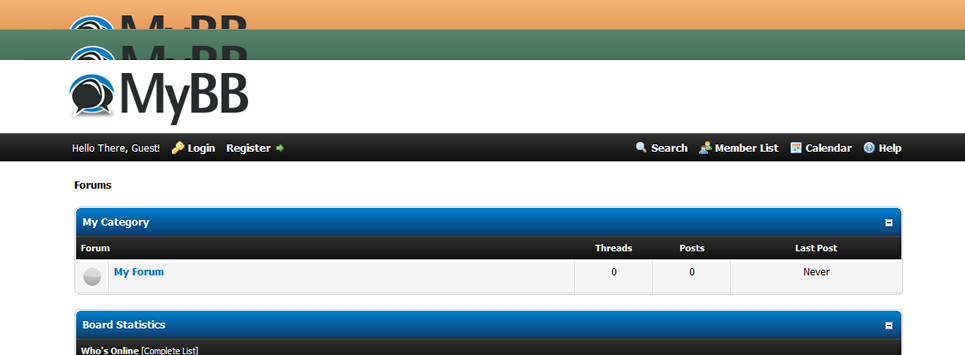
The new default theme for MyBB 1.8

The new default theme for MyBB 1.8

These changes to the theme system allow you to create colours to which you can attach stylesheets (just like you can attach stylesheets to pages). You can also set a display order for all your stylesheets so that they can override styles. Together, the changes mean you can add a theme with as many custom colours as you want. Using the parent/child theme structure that already exists in 1.x you can restrict or allow certain usergroups to use these colours and, as they inherit the main stylesheets, they’re very easy to manage. So, there is no longer the need to install a dozen different themes just for a different colour header.

A New Look Admin Control Panel (ACP)

Along with the new default theme there needs to be a new look Admin Control Panel (ACP). Our ACP is regarded as one of the easiest to use; it’s friendly and we didn’t want to change it much. Instead, we gave it a similar Apart makeover to our front-end.

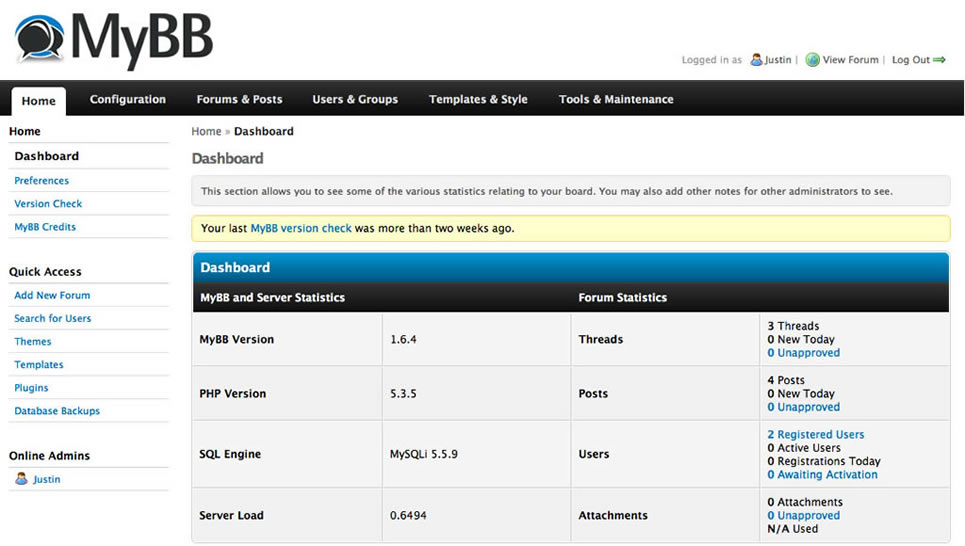
Screenshot of the MyBB 1.8 ACP

Screenshot of the MyBB 1.8 ACP

Please note that along with the default theme the look may change as development continues.

Powered by jQuery

While 1.8 won’t be able to make your cocoa or project your forum’s logo onto the moon, much to our disappointment, we really weren’t pulling a prank on this one; MyBB 1.8 will be powered by jQuery. The lighter and more powerful JavaScript library should be able to extend what both Theme Artists and Plugin Developers are able to do without causing conflicts or heavy loading pages. Both front-end and back-end will use the library. This change is probably the most destructive for themes and plugins in the 1.8 upgrade and we’ll be providing support throughout its beta period ready for a main release. In total, including the changes to the default theme, about 20 templates require updating from 1.6.

Along with jQuery comes a change in post editor. Although I’ve had my eye on an ‘off the shelf’ editor for quite some time we’ve yet to make a decision on whether we write our own or not; we’ll be covering that in a future tour. However, please don’t suggest which editor to use as our aim is to make it interchangeable so you can use your favourite one.

Trash Can

One of the most requested features for MyBB is a trash can – or as I prefer, the ability to recover deleted posts. In 1.8, you’ll be able to decide if a user’s deleted post is obliterated forever or is recoverable via the Mod CP. Global and usergroup permissions will allow this to be controlled across your users.

Spam Improvements

For those of you waiting for Spam Ninja I’m very sorry to disappoint as I did promise it to you last year. As soon as 1.8 was decided, I stopped developing it as a plugin and started integrating relevant parts into the core instead. We’ll be looking to improve spam prevention and detection in 1.8 which we’ll cover in a future tour.

Upgrading to 1.8

Upgrading to 1.8 will be similar to upgrading from 1.4 to 1.6; many plugins will only need to change their compatibility line and will only need some major changes if they use Prototype JavaScript, use login functions or make large theme changes. Throughout the beta period, we’ll be upgrading the Wiki with new information and providing support to plugin developers to help them with their new plugins.

Github

The Team has been trying to plan a move away from our current SVN setup to the popular social coding site Github for some time. We’ve come up against problems but feel confident that now is the time to open up our development to people outside of the MyBB Team. Github can be an extremely powerful tool for development and it is something we’re eager to do – we have been working on 1.8 in secret in one of our repositories there which will be made available after our first beta release.

We’ve gone outside of our usual box with 1.8 in that we’re actually telling you what we’re doing and what we’re planning even though none of this is public. We’re aiming to provide a beta of 1.8 in May so please be patient while we’re polishing our development and removing all the takeaways and soft drink cans.

Wrap

With MyBB 1.8, our aim is to fully complete the series with features and improvements that make us a better rival not only to our free forum software friends but also to commercial community software too. We want to make it more friendly, faster and go further than any of our products have been before. Everyone here at MyBB is looking forward to 1.8 and hope you are too!

See you at the next tour!


Copyright © Zaki's Blog.

Managed by FHMZK